Short answer: in a saved copy of the Set, test a plain Simpler in Classic mode with Warp off, neutral pitch controls and a Tuner straight after it. Play C3 from Live's own MIDI editor. Under ordinary 12-tone tuning, that plays the recording at its original pitch, which is not necessarily the note C. Check the source, the incoming MIDI and any modulation before you retune anything. Slice mode picks out pieces of audio and needs a check of its own.
A sample can be sharp the whole way through, slide during its tail, or only sound wrong once Warp is on. Those are three different problems. Start with one note and the unprocessed file, and you will hear exactly which change brings the mismatch in.
Run a one-note pitch test before changing the sample
- Save a new version of the Set and keep the original instrument and MIDI clips intact.
- On a separate diagnostic MIDI track, load the original audio file into a plain Simpler in Classic mode and turn Warp off. Skip existing Rack presets or sliced devices for this test.
- If the Set has a custom tuning, switch on Bypass Tuning for this diagnostic track in its I/O section before you draw the test note. Leave the Set-wide tuning where it is.
- Create a new clip with one sustained C3 in Live's MIDI editor. Bypass any MIDI effects before Simpler, and use a fresh clip with no pitch-bend or note-expression data.
- Put Tuner immediately after Simpler, ahead of any other audio effects. Set Transpose and Detune to zero, and neutralize Spread, the pitch envelope, LFO Pitch and glide.
- Play the same stable portion of the sample each time. Compare it with the original file, then bring back one feature at a time on the copy.
Tuner analyzes monophonic pitch; it does not correct anything. A chord, a noisy attack or a harmonically dense sound may not give you a reliable single note. For vibrato or a falling bass note, compare the same sustained portion and trust your ears as well. Agree on the reference tuning before deciding whether the sample or the Set is at fault. An online pitch detector gives you the same kind of reading for the raw file outside Live.
C3 is Simpler's original-pitch reference
The Live 12 Simpler reference names C3 as the original-pitch reference. Run that test in melodic playback with Warp off, neutral pitch controls and ordinary 12-tone tuning. Simpler does not analyze each recording and quietly retune it to C. Go by the note label in Live, since octave names can differ between applications.
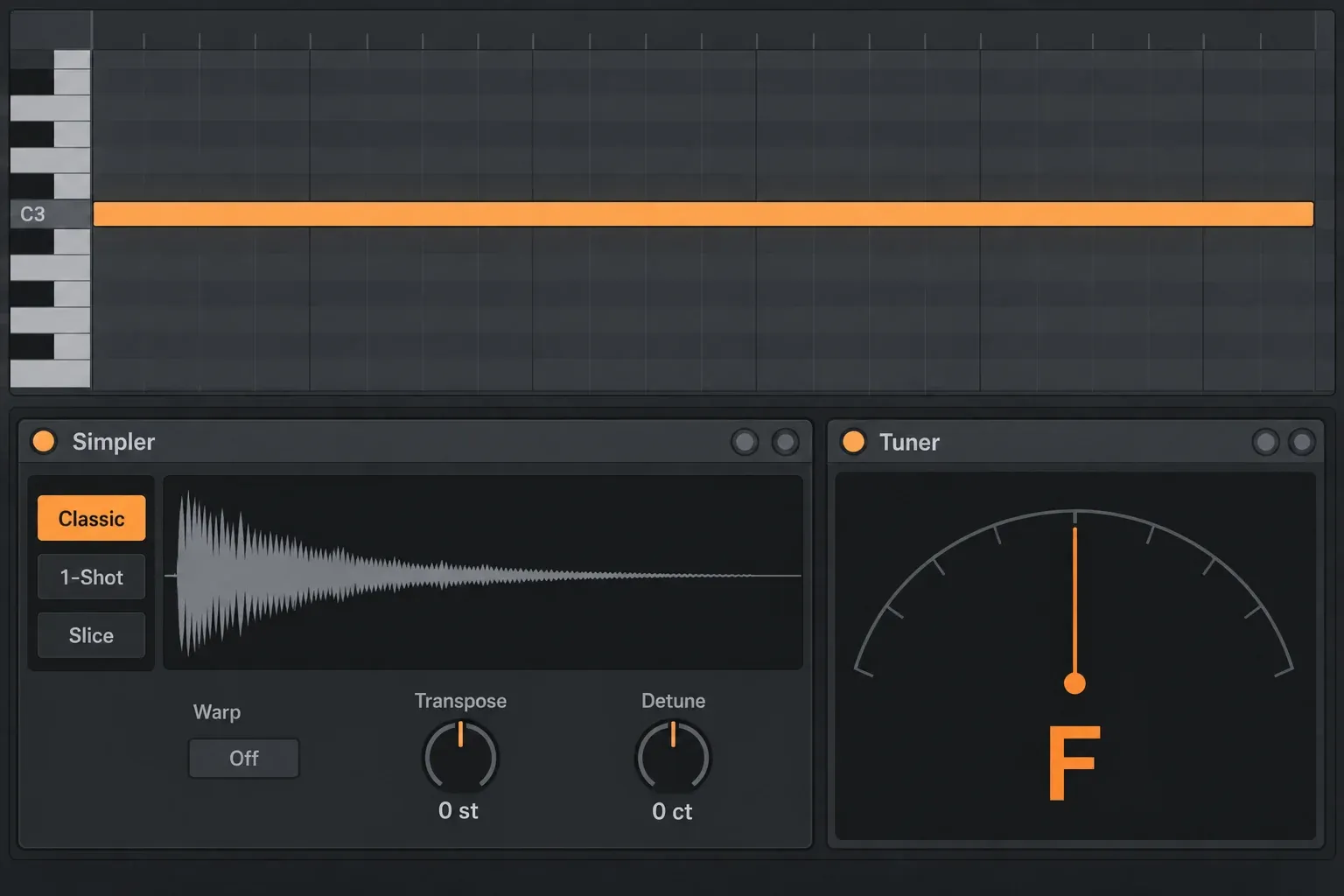
Here is what that means in practice. In the plain setup, a recorded F still sounds as F when C3 triggers it, and D3 moves it up two semitones to G. To make a melody's note names match what you hear, first identify a stable source note. Then pick the mapping you actually need:
- For melodic playing, adjust Transpose so C3 produces the intended C, then fine-tune the cents. Check the octave too, because matching the letter C tells you nothing about the register.
- For a one-shot that should stay untouched, keep its original pitch and choose the trigger note to suit. Put the real source pitch and trigger in the preset name.
A steady F can move down five semitones to the C below or up seven to the C above, and neither is automatically the right register for the song. After tuning, check a lower and a higher note instead of trusting the sample's filename.
Correct coarse pitch with Transpose and fine pitch with Detune
Simpler's Transpose control moves the sample by up to 48 semitones in either direction, and Detune adds fine correction of up to 50 cents either way. Use them in that order:
- Play C3 and read the nearest stable note in Tuner.
- Move Transpose in whole semitones until the note name is right.
- Touch Detune only once the note sits inside the correct semitone.
- Play a lower and a higher MIDI note to confirm chromatic tracking.
In ordinary 12-tone equal temperament, 100 cents make one semitone. Take whole semitones for the nearest note and Detune for the fraction that remains. No fixed Detune setting can remove changing vibrato or a pitch slide, so if the attack and the tail disagree, decide which part should anchor the instrument before you process the recording.
Warp changes time behavior; it is not the first tuning control
With Warp off in melodic playback, higher notes play the sample faster and lower notes slower. Warp can separate timing from pitch, but the mode matters: Re-Pitch links playback speed and pitch, so it is the wrong choice when you want independent chromatic tuning while the tempo changes. Go back to Warp off for the original-pitch test, then choose a suitable stretch mode if the phrase has to follow the Set.
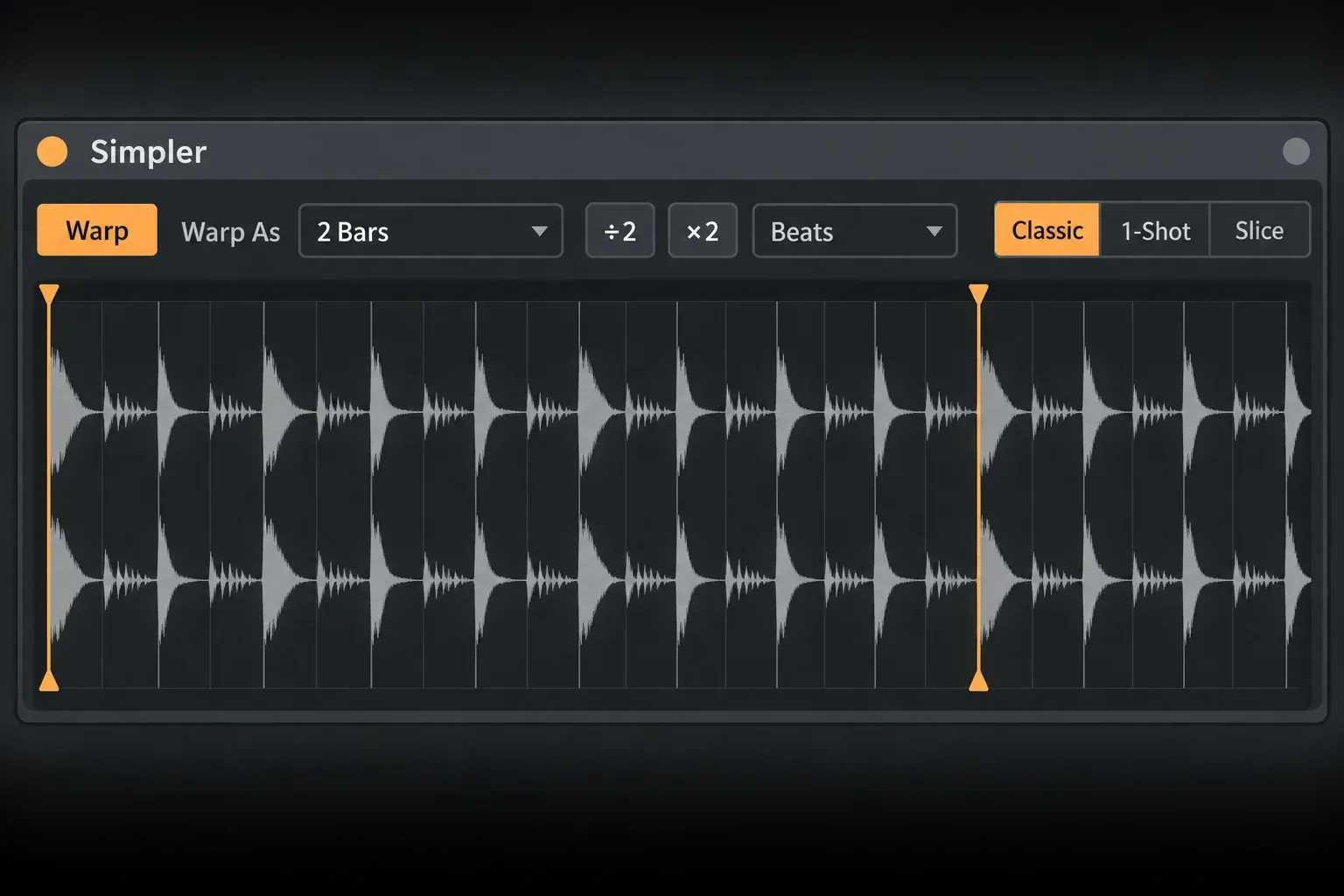
If the loop takes twice or half the beats you expect, check Warp As and its ÷2/×2 buttons, because Live's estimate of the musical length can be wrong. A timing error is not automatically a tuning error either; whether the pitch changes too depends on the Warp mode. For a stable one-shot, leave Warp off unless you need independent stretching, and compare Warp modes and marker placement for longer phrases.
Separate tuning error from Warp artifacts
A tuner can report the right fundamental while your ear still rejects the result. Complex and Complex Pro can smear transients or add a phasey texture, Beats can sound stepped on sustained tones, and extreme stretching can expose modulation in the source. That is a quality problem, not necessarily a pitch error.
- Wrong pitch even with Warp off: look at the source note, incoming MIDI, reference tuning and pitch controls before changing Transpose.
- Right pitch but wrong loop duration: check Warp As and the intended beat count.
- Right note but a grainy or phasey tone: compare Warp modes against the unwarped source at the same note.
- Pitch moving through the tail: compare the original recording with the device's pitch modulation over the same stretch.
Clear hidden pitch movement in the device and clip
On the diagnostic copy, go through the controls that can move or blur pitch, and retrigger the test note after each change:
- Incoming MIDI: bypass Pitch, Scale, Chord or any other note-processing device before Simpler. Check controller transposition and recorded note-expression or pitch-bend data separately from the drawn note.
- Pitch envelope: set its amount to zero. An envelope meant for drum attacks can bend a sustained sound.
- LFO Pitch: set the amount to zero, and bring it back later if vibrato is part of the sound you want.
- Spread: set it to 0% and play a new note. Spread uses two detuned, panned voices per note, and its value at note-on is what counts.
- Pitch bend: center the wheel and look at recorded controller data; a Transpose of zero does not rule out bend.
- Clip envelopes, automation and mapped controls: find out what is really driving Transpose. Compare on a fresh clip rather than deleting the original automation.
- Glide or Portamento: switch it off for the isolated test so the previous note cannot decide where the new one starts.
Bring features back one at a time and replay the same phrase. If a mismatch appears, test that change again before blaming the source file, since two controls can interact. Once you know what each one contributes, keep the vibrato, glide or stereo detuning you actually want.
Check the Live 12 tuning system when every instrument is shifted
Live 12 uses 12-tone equal temperament by default, but a Set can load a custom tuning. Ableton's tuning-system reference explains that a loaded tuning changes the pitches the piano roll represents, while the reference frequency can shift the whole Set up or down.
Save a separate Set version first. In a Set with a tuning file, use the diagnostic MIDI track's Bypass Tuning toggle to compare against 12TET locally. A custom tuning may be deliberate rather than faulty, so do not remove or replace it as a first troubleshooting step. With Retune Set On Loading Tuning Systems enabled, switching or removing a tuning can change notes and can shorten or delete overlapping notes that land on the same pitch. Even without automatic retuning, the same note positions may produce different pitches after a tuning change.
Slice mode is a different mapping problem
Slice mode gives different pieces of the sample to different MIDI notes. C3 is not "the first slice" here, and the melodic C3 test does not apply to this mapping. Play the slice notes and watch which region responds. If the wrong piece plays, fix the trigger or the boundary before changing its pitch. A sliced break can hold drums, vocals and chords at once, so it need not have one root note for the whole file.
A Simpler inside one Drum Rack pad receives that pad's routed note, not a free keyboard range. Ableton explains why Slice mode inside a Drum Rack can play incompletely or remain silent, so test slicing on a separate MIDI track. Where your edition has the command, Slice to New MIDI Track builds a new Drum Rack and a clip that plays the slices in order, leaving the original device alone. The audio-to-MIDI and slicing guide separates slicing recorded sound from extracting musical notes.
Reduce processing without changing the instrument’s job
- For a non-rhythmic one-shot, try Warp off. If you need stretching, Ableton warns that Complex/Pro and rapid retriggering can be demanding, so choose by what you hear and the load you measure.
- Switch off unused filters or LFOs, set unnecessary Spread to zero, and reduce voices only as far as the part allows. Cut them too far and sustained notes get chopped.
- Transpose and Detune change device settings; they do not create new rendered sample files. Don't expect a fixed RAM saving from them, because sample length, channels, voices and the rest of the Set still matter.
- Keep the original audio and preset. Rather than rendering several near-identical tuning fixes, save a named preset for the mapping you chose. Collapsing useful stereo information or disabling needed tempo-following just to reduce load is a bad trade.
Confirm the repair before replacing the original
- Save a separate Set version and keep the original instrument and MIDI intact.
- Use a plain Classic-mode Simpler on a diagnostic track; bypass that track's custom tuning if one is loaded, then play C3 from a fresh clip with Tuner immediately after Simpler.
- Start with Warp off, no incoming MIDI pitch effects and neutral Transpose, Detune, Spread, pitch modulation, bend and glide.
- Identify a stable source pitch; use Transpose for whole semitones and Detune for cents, and check the intended octave and neighboring notes.
- Restore any Warp mode and musical length you need, then bring modulation back one control at a time while checking the same phrase.
- Compare the corrected phrase with the song's intended tuning before replacing the original instrument. Keep the saved original, and never remove a Set-wide tuning as a shortcut.
If the sample cannot be found at all, restore the missing sample file before testing pitch. Once it plays correctly, the MIDI and sampling workflow helps you choose between melodic playing, chopped phrases and separate drum pads.
FAQ
Why is my sample out of tune in Ableton Simpler?
Check the source pitch, incoming MIDI, playback mode, Warp, pitch controls and the intended tuning. Use a plain Classic-mode Simpler with Warp off and a fresh C3 clip on a saved diagnostic copy. Tuner is useful for a stable single note, but it is not a reliable key detector for every chord or drum sound.
What note plays the original sample pitch in Simpler?
In melodic playback with Warp off, neutral pitch controls and ordinary 12-tone tuning, C3 is Simpler's original-pitch reference. A recording of F therefore sounds as F, not automatically as C. Slice mode maps different pieces to different notes instead.
Should Warp be on in Simpler?
Use a suitable Warp mode when the phrase has to follow the Set tempo independently of its melodic pitch. Re-Pitch links speed and pitch, so it cannot stand in for the pitch-preserving stretch modes. Warp off is the right choice for a conventional one-shot and for the isolated original-pitch test.
How do I change the root note in Ableton Simpler?
For melodic playback, adjust Transpose and Detune until the intended trigger matches the pitch you hear. Sampler offers explicit root keys and multisample zones, but you need a license that includes Sampler, and Ableton warns that converting from Simpler does not keep its Warp or slicing behavior, so keep a copy and compare before replacing the device. Check the Sampler entry in the edition comparison and the conversion warning in the Simpler manual.
Why does a tuned Simpler sample still sound out of tune?
Play a fresh note with Spread, pitch envelope, LFO Pitch, bend and glide at neutral, and bypass incoming MIDI pitch effects. Check automation and the track's intended tuning without removing the Set-wide tuning. A drifting source or a polyphonic recording can also stop Tuner from settling on one reading.
Does turning Warp off save CPU?
Yes, skipping Warp can reduce processing for a one-shot that needs no time stretching. Ableton also recommends avoiding Complex or Complex Pro when a lighter mode works, setting Spread to 0%, reducing voices and switching off unused filters or LFOs. Just don't give up tempo behavior you need purely to save CPU.