Short answer: put Compressor on the bass, switch on its external Sidechain and pick the kick in Audio From. Use Peak or RMS mode rather than Expand, and keep Ratio above 1:1. For the first pass, set sidechain Mix and the main Dry/Wet to 100%, make sure detector listen is off, then pull Threshold down until the bass's gain reduction starts moving with the kick.
Everything below describes Live 12's native Compressor, checked against Ableton's documentation on September 5, 2026. Glue Compressor and third-party plugins lay things out differently. Keep the two roles straight: the bass is the audio being turned down, and the kick only tells the detector when. If you use a plugin instead, it may need its own external-sidechain support enabled before choosing a source does anything at all.
Route the detector before choosing settings
- Save a copy of the Set so you can compare later. Keep your monitoring level comfortable and note any automation already moving the device or its gain.
- Put Compressor on the bass track and make sure it is switched on. If it lives inside a Rack, that Rack has to be active too.
- Open the Sidechain section with the toggle next to the device name, turn Sidechain on and choose the kick track in Audio From.
- Pick Post FX for this first test. The trigger then includes whatever devices sit on the kick, but not its fader. The other tap points have their own jobs, covered further down.
- Choose Peak mode and Ratio 4:1. Set sidechain Mix and the main Dry/Wet to 100%, leave the sidechain EQ and the headphones (listen) button off, and start with Out at 0 dB.
- Play a section where kick and bass overlap. Lower Threshold until the gain-reduction display moves on every kick, then start working on depth and timing.
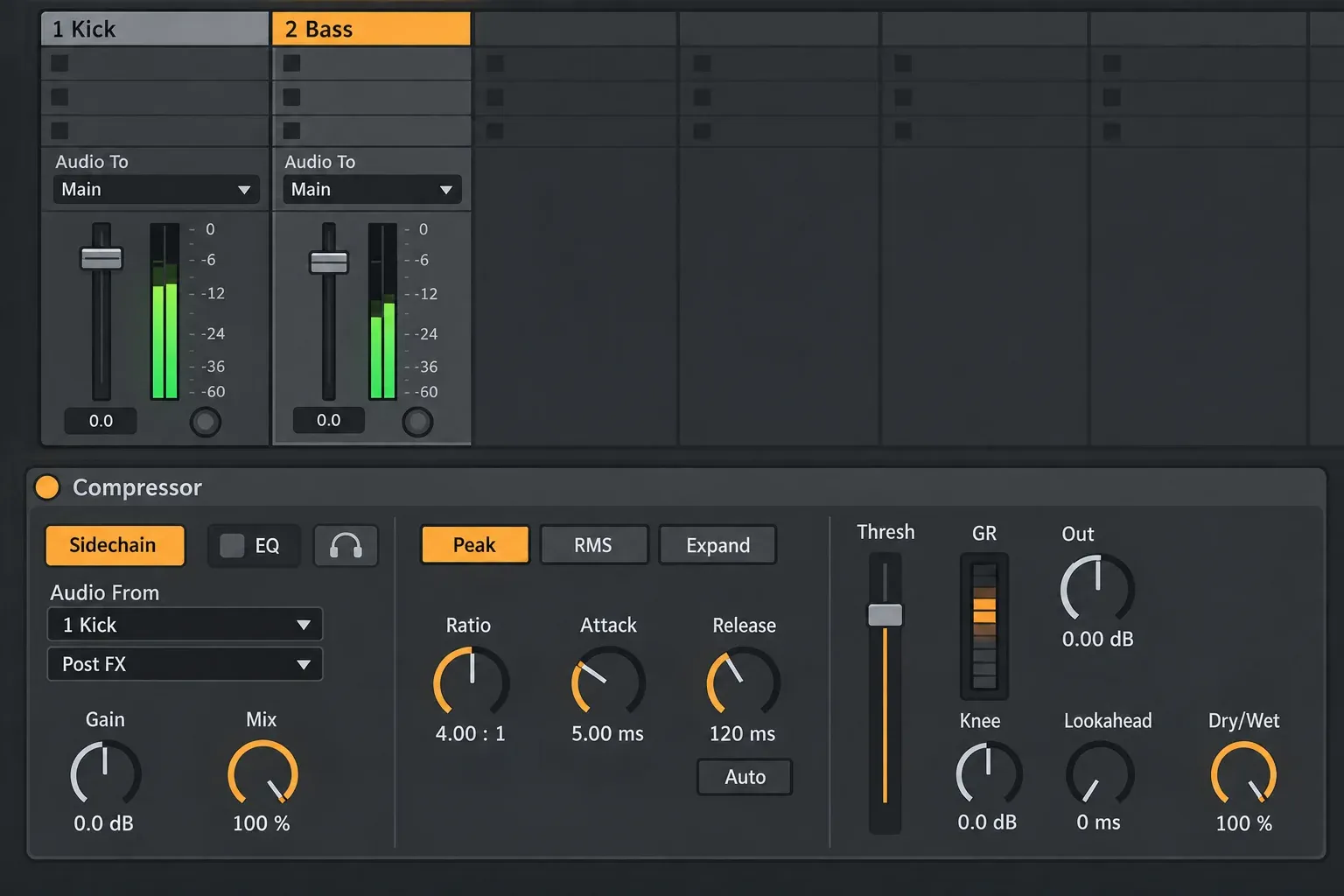
That is the whole idea in one picture: the compressor lives on 2 Bass and listens to 1 Kick. As Ableton’s current Compressor reference explains, the external signal only steers the compression; you never hear it through the bass channel. That is also why sidechain Gain changes what the detector receives rather than how loud the kick is. One more thing to expect: automatic Makeup is unavailable with an external sidechain, so set Out yourself instead of letting a louder bypass fool your ears.
Read the current Compressor sidechain panel
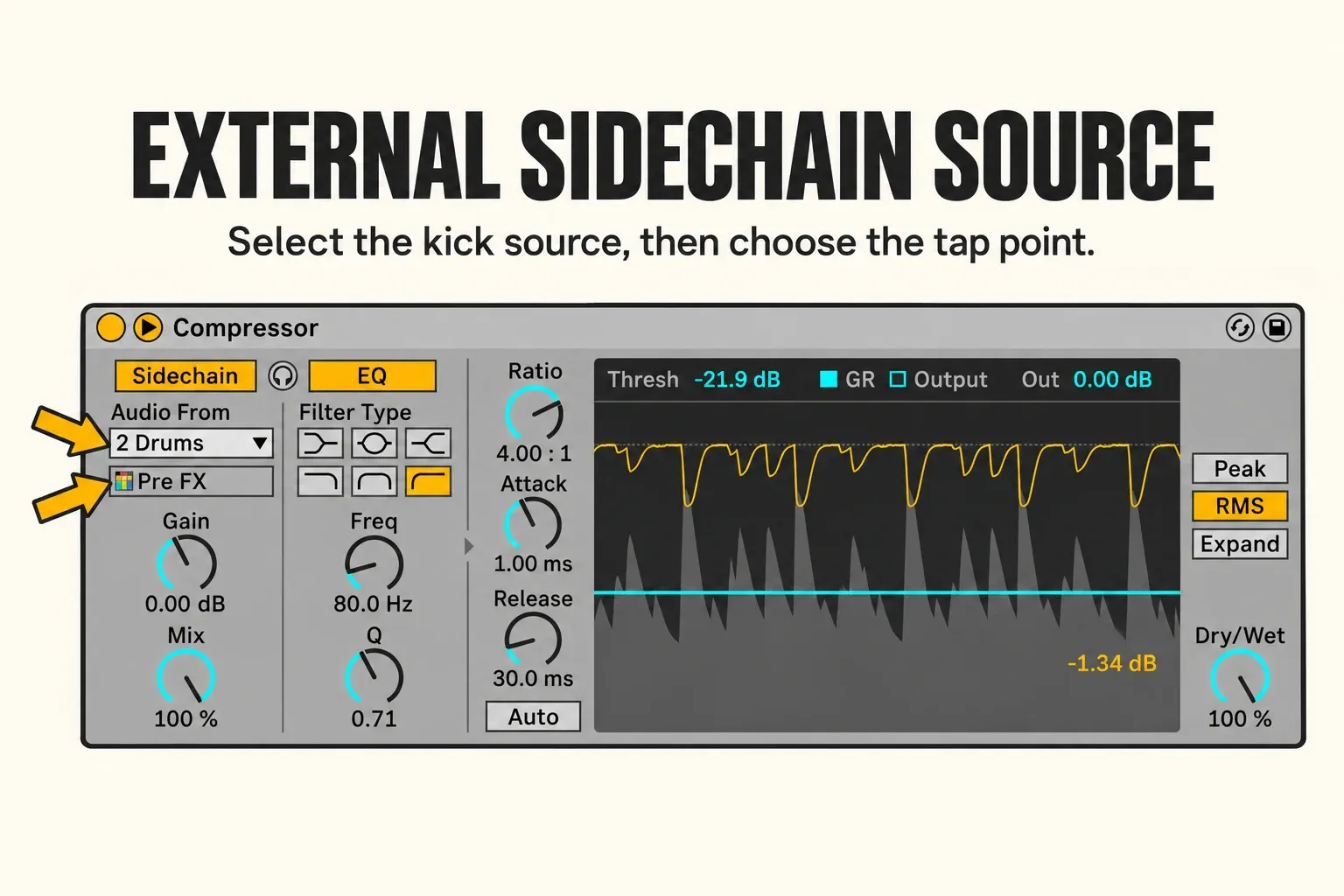
- Audio From picks the trigger track. The chooser underneath sets its tap point, or a sub-source when the track offers one.
- Gain sets how hard the external signal hits the detector. The kick you hear stays exactly as loud as before.
- Mix, on the left, is the sidechain's own Dry/Wet from the manual, and it blends detector sources. At 100%, only the external source triggers compression; at 0%, Compressor listens to its own input.
- Dry/Wet, on the far right, is a different control. It blends compressed and untouched bass: 100% gives you the processed bass, 0% the dry one.
- EQ shapes only what the detector hears. It does not turn Compressor into a multiband processor, and it leaves the bass you hear unfiltered.
- The headphones button swaps the output for the detector signal so you can hear what is triggering. Handy for a moment, but switch it off before you judge the mix.
In this close-up the source is a drum track at Pre FX in RMS mode, with a detector filter already set. Read those threshold, attack, release and filter values as an example rather than a preset for your song. The filter in particular: set it only after you have confirmed that the trigger reaches the compressor at all.
Try a one-bar example before tuning the whole song
Before touching the real song, build a tiny test. Open a separate Set at 120 BPM with four short kick hits on the quarter notes and one sustained bass note. Start in Peak mode with Ratio 4:1, Knee 0 dB, Attack 5 ms, Release 120 ms, Auto Release off and Lookahead 0 ms, plus the 100% mix settings from above. Then lower Threshold until each kick carves an obvious dip. Around 3–6 dB makes the movement easy to see; it is a test range, not a target for the finished mix.
At 120 BPM the kicks land 500 ms apart, so you want one dip per kick and the meter heading back toward zero before the next beat. The Release value will not match the actual recovery time exactly, because trigger length, Threshold and the envelope all play a part. If a long kick tail keeps the bass pinned down, shorten the trigger before you push Release to something very fast.
No dip at all? Check the basics before going lower with Threshold: is the device on, is it in Peak or RMS, and is Ratio above 1:1? Then look at the source and tap point, confirm sidechain Mix sits at 100%, and make sure the kick actually reaches the detector. A short burst of listen tells you what it hears; switch it off again afterwards. The troubleshooting list further down separates these routing problems from dry-path and timing issues.
Once the example makes sense, take what you learned about the gain-reduction envelope back to the real song. If the bass turns thin, rough or late, back off. Keep your original Set saved before experimenting, and keep only one heavy Set open at a time.
Threshold and Ratio decide how much space you make
Threshold and Ratio work as a pair. With a hard knee, compression starts right at the threshold; a soft knee eases in around it. At Ratio 1:1 nothing happens, wherever Threshold sits. Reach for a stronger ratio only when the extra reduction actually helps the mix.
For clean separation, I would start with just enough reduction to let the kick's attack through. For an audible pumping effect, go deeper and shape the return with Release. Expect the same numbers to behave differently as soon as the kick level, sidechain tap point, bass envelope or tempo changes.
If the bass loses weight across the whole bar, Threshold may be too low, Ratio too high or Release too long. If the kick is still buried, the detector may not be getting the kick consistently, or the reduction is simply too shallow.
Attack controls what survives at the front
Attack sets how quickly the compressor reaches its intended reduction once the detector crosses Threshold. A fast Attack pulls the bass down right at the kick's onset. A slower one lets a little of the bass transient through before the duck lands.
Fastest is not automatically cleanest. Ableton's Compressor documentation warns that extremely short attack times can take the life out of a sound and add buzz-like distortion. On low bass notes, listen for a click or a rough edge as well as watching the meter. Raise Attack until the artifact goes away, then check whether the kick still has enough room.
Release controls the recovery and the groove
Release sets how quickly the bass comes back once the detector falls below Threshold. Too short, and gain reduction can chatter or recover inside the kick tail. Too long, and the bass is still ducked when the next beat arrives.
Set Release by ear, against the tempo of the song:
- Loop the kick-and-bass pattern that matters and watch the recovery between hits.
- Shorten Release if the bass stays down longer than you want; lengthen it if the recovery chatters or clicks.
- Judge the groove in the full mix at a comfortable level. The display alone will not tell you how it feels.
- Play sparse, dense and changing-velocity passages before you commit to a value.
Auto Release adapts to the incoming material. I would start with a fixed value, because it makes the first timing comparison easier to follow, and try Auto afterwards if the trigger varies a lot. Neither mode wins for every arrangement.
Use the detector EQ to reject the wrong trigger energy
A low-pass filter on the sidechain can make a mixed drum bus react mostly to the kick instead of the hats. It cannot promise perfect isolation, though, because snares and other sounds share some of that range. Remember what the filter touches, too. Compressor still turns down the entire bass signal; filtering the detector does not limit the gain reduction to the bass's low end.
Turn on sidechain listen, move the filter until the event you want dominates, then turn listen off again. Leaving it on is an easy way to mistake the detector signal for your processed bass. A dedicated kick track usually needs far less filtering than a full drum bus.
Pre FX, Post FX or Post Mixer: choose the stable trigger
- Pre FX: the raw kick drives the duck, so it stays consistent even while you change the kick's insert processing.
- Post FX: saturation, shaping and other kick inserts change what the detector sees.
- Post Mixer: the kick's channel level and mixer moves also change how much the bass ducks.
Choose the tap by asking what should influence the duck. Live’s internal routing reference separates the source, the device output and the final mixer output. Pick Post Mixer if fading the kick down should also ease off the ducking. Stay on Post FX when that fade should leave the duck alone; it still follows changes inside the kick's device chain.
Use a single Drum Rack kick or a silent ghost trigger
If your kick lives inside a Drum Rack, choose its track in Audio From first, then open the second chooser and pick the named kick part rather than the whole kit. Ableton’s authored sidechain tutorial shows this source selection. The exact entries depend on the Rack, so confirm with detector listen that you have the kick, then switch listen off. Layered instruments and third-party drum plugins do not all expose their outputs the same way.
A ghost trigger helps when you want a duck that ignores the audible kick's processing, or one that keeps pumping through a break where the kick drops out. Make a separate audio track called SC Trigger, outside any group. Put a short kick or click wherever the duck should happen, set Monitor to Off and leave the track active. It has to be audio: MIDI notes on their own cannot drive the native Compressor's audio detector.
Set SC Trigger's Audio To to Sends Only and keep every send fully down. Leave its fader at 0 dB and keep it away from Main and any other track you can hear. On the bass Compressor, select SC Trigger at Post FX. The clips keep feeding the detector while the track itself makes no normal sound. If you can hear it, look for a stray route, and switch detector listen off when you finish testing.
The ghost pattern has to follow the arrangement by hand. Edits to the real kick will not update it, so remove ghost hits wherever the ducking should stop, or keep them through a break on purpose. If the original single-kick source does the job, use that and skip the duplicate pattern.
When sidechain compression is the wrong tool
You do not have to sidechain everything. If the kick and bass already sit in compatible timing and frequency ranges, a forced duck can simply make the low end smaller. Look at note lengths, the arrangement and your gain staging in Ableton Live first.
Reach for volume automation when the dip should follow a shape you draw rather than the detector level. Edit the bass MIDI or its envelope when the clash comes from overlapping note tails. Keep compression for the moments where the trigger's performance should drive the movement.
Why Ableton sidechain compression is not working
- The kick gets quieter: Compressor is probably on the wrong track. For bass ducking it belongs on the bass, and detector listen should be off.
- No gain reduction at all: switch on the device and any Rack it sits in, choose Peak or RMS instead of Expand, set Ratio above 1:1, then check Audio From, the tap signal, sidechain Mix and Threshold. A silent trigger needs a routing fix; more sidechain Gain will not help.
- The meter moves but the bass barely changes: set the main Dry/Wet to 100% while you diagnose, make sure the bass is actually sounding during the dip, and look for a parallel dry route or later processing hiding the effect.
- Every drum hit ducks the bass: pick the single kick source where one exists, use a dedicated trigger, or filter the detector within the limits described above.
- Clicks or a rough bass: ease off the reduction and lengthen Attack or Release. Check whether the trigger has an unnecessarily long or uneven tail.
- The bass never comes back up: look at trigger length, an excessive detector level, a low Threshold and a long Release together.
- Moving the kick fader changes nothing: Pre FX and Post FX both sit before that fader. Switch to Post Mixer only if you want the fader to count.
Keep the setup light without breaking its routing
- CPU: start with one Compressor and one direct source, then watch what this Set actually costs. If the load climbs, look for a duplicate instrument or an unnecessary effect chain before giving up ducking that works.
- Latency: Compressor offers 0, 1 and 10 ms of lookahead. Longer settings delay the processed path, and 0 ms does nothing about latency elsewhere in your interface or Set.
- RAM: gain and detector-routing changes will not unload sample instruments. A short audio trigger saves you from duplicating a whole instrument Rack just to get a control pulse.
- Disk: routing needs no new rendered audio. Freezing and bouncing do create files, so keep the original media and an editable version.
- Keep the instrument and effect chain editable unless its real load or your delivery needs justify rendering it. After any freeze, bounce or routing change, check the sidechain source again.
A repeatable sidechain setup in six checks
- Name the roles. Decide which track triggers and which track ducks, and save a comparison copy before changing routing or automation.
- Place the device. Switch on Compressor on the track that should duck, choose Peak or RMS and set Ratio above 1:1. Peak at 4:1 makes a good first test.
- Route the detector. Turn Sidechain on, pick the trigger and tap point in Audio From, set sidechain Mix and the main Dry/Wet to 100%, and keep detector listen off.
- Check gain reduction. Play the trigger and the ducking track together, then lower Threshold until every intended hit produces reduction. Fix a silent detector source before you raise its gain.
- Shape the movement. Set the depth with Threshold and Ratio, then listen to Attack and Release. Match levels by hand, because automatic Makeup is unavailable with an external sidechain.
- Test the arrangement. Play sparse, dense, quiet and loud passages, bring back any automation you parked, and make sure a ghost trigger follows the final rhythm.
For wider balance and delivery work, carry on through the mixing and export hub. If you need to freeze or bounce a processor-heavy track, keep the original and listen to the render to confirm the ducking made it through.
FAQ
How do I sidechain a bass to a kick in Ableton Live 12?
Put Compressor on the bass, turn on external Sidechain and choose the kick in Audio From. Use Peak or RMS with Ratio above 1:1. While you diagnose, set sidechain Mix and the main Dry/Wet to 100% and keep listen off, then lower Threshold with both sounds playing. Once the kick produces gain reduction, adjust depth and timing.
Should the compressor go on the kick or the bass?
On the bass, or the 808, because that is the signal being turned down. The kick is only the external detector source. It keeps its normal audible route, or you can drive the duck from a silent ghost trigger when the arrangement calls for it.
Why is there no gain reduction?
Work through the chain: device and Rack switched on, Peak or RMS instead of Expand, Ratio above 1:1, a trigger that is actually playing at the selected Audio From tap, then sidechain Mix and Threshold. A short burst of listen confirms what the detector hears. If gain reduction moves but the bass does not audibly duck, check the main Dry/Wet, any parallel dry path and whether the bass is playing during the dip.
What Attack and Release should I use for sidechain compression?
There is no universal pair. For a 120 BPM test, 5 ms Attack and 120 ms Release with Auto off is a sensible place to start; adjust from there while you watch and hear the bass recover between kicks. Treat them as starting values rather than proven timings. Trigger length and the depth of compression change the recovery too.
Does sidechain Gain make the kick louder?
No. It changes the level going into the compressor's detector. In Ableton's design the external sidechain signal controls gain reduction and is never mixed into the processed bass.
Does Ableton sidechain compression use much CPU or RAM?
Look at your own Set instead of assuming a fixed cost. Compressor's lookahead options of 0, 1 and 10 ms can add latency to the processed path. Skip duplicating a heavy instrument just to get a trigger; a short audio track does the job. Routing and gain changes will not unload sample instruments that are already loaded.